Showing posts with label SSIS. Show all posts

Saturday, July 26, 2008

ETL Specification, Part 1

Specifications are vital to the success of a data warehouse project, just as good specifications are vital to ANY software project. Specifications are important not for their page count or weight, but for the thought required to commit their contents to paper. I have seen too many "White Board Cowboys" create a so-called specification as a series of scribbles on a dry erase board. I am a big fan of White Boards, but they are a collaboration tool. A good spec should communicate the following:
  1. What the developer is to do
  2. How the developer will know when it the work is done
  3. Anticipate and eliminate points of potential confusion

Item #3 is the whole reason for the specification. It is in thinking the design through in which truly calendar-busting problems are resolved. A recent client suggested that because development tools (and frameworks) had evolved to such an efficiency point, the task of software design was obsolete. Nothing, in my opinion, could be further from the truth.

"...I have always found that plans are useless but planning is indispensable." - Dwight D. Eisenhower

More on this subject shortly...

Friday, September 21, 2007

File Download via HTTP

SSIS has some interesting components for 'out of the box' support to obtain data via FTP and even Web Services. However, in creating a demonstration project for a class I am teaching, I found the need to download files from a web page via http. I found a cool little script on sqljunkies that did just the trick.

To further describe the problem, I am interested in downloading the weekly performance statistics for Division 1 College Football, graciously made available by the NCAA here. There are three files, one each for the schedule, offensive and defensive statistics. I really want the package to fire on a weekly basis, and get the new stats updating my data mart.

As a brute-force, first-pass effort, I created package variables to represent the remote file uri, the local filename and local path. In the case of the Offensive production statistics, these variables were named RemoteUriOffense, LocalFileNameOffense, and Extract_Home. Unfortunately, one of the downsides of the script task is having to use some variable at the package (or container) level and explicitly declare that variable as being available for read access by the script. An example of that is below:


Substituting the variable names declared as readable by the script, in the script code as illustrated below.

While the script task from sqljunkies does get the job done, there are a few disadvantages. First and foremost, creation of the variables for each of the files. I could have done some manipulation of a single set of variables, iterating through for all three files, and using a single script task, firing the task once for each file instance. Additionally, given the variable infrastructure needed for the script task, and the probability this is not the last time I will ever get data via http, this may be a good candidate to create a custom component.

Among the advantages of the custom component, all the logic for file download would be centralized. What happens, in my three-script components when the a change occurs to the download logic (for instance)? Yep, I am replicating the change for each extract. True enough this problem is solved by using a single script task and iterating over a list of files to download.

However, this may just be the perfect task on which to base a first custom component. Stay tuned.

Thursday, September 13, 2007

Expressions and the Data Flow Pipeline

File this under the "more than one way to skin a cat" topic. I am creating a demo for one of my upcoming presentations, and I noticed a technique for cleaning data from extracts that escaped my earlier reading/training/lab time.

In particular, I am creating some SSIS packages to load Comma Separated Variable (csv) files. Only these files, from an extract provider over which I have little or no control, contain embedded quotes in them. For example a data record would read:

"column1 value", "column2 value", "column3 value"

This did not strike me as odd until the flat file connection manager for this extract had NO desire to see the quotes as part of the field delimiter. Unfortunately, my first pass at loading this data created a table with the following values.

Column 1
Column 2
Column 3
"Value"
"Value"
"Value"

Obviously, NOT what I wanted, even in a staging table, with which to begin my Transform and Load processing.

One way or another, I would have to strip the double quotes out of the data, and for some reason I latched onto the idea of using an expression within an SSIS Derived Column transformation.

Soon enough, I had the Derived Column transform, and was feeding it a steady diet of DT_STR columns from the Flat File Data Source. It seemed as though surely the REPLACE function would suit my needs, but how to express the target expression is "? To little surprise REPLACE(column1, ""","") is NOT what the SSIS Execution Engine is looking for. Thankfully, in the books online Microsoft has furnished a reference for common escape sequences. In my case, " was just what the doctor ordered. REPLACE(column1,"\"","") effectively stripped all of the quote characters from the data, leaving my staging table looking a little more appealing.

Somewhere on the Web, I found a custom SSIS component to strip quotes from an extract. That still may be worthwhile, as my candidate inbound set only had 50,000 or so records.

If anyone out there reading this has ideas as to how to download files (using http), and without a Web Service, drop me a reply via the blog. Perhaps that will be the subject of my next post.


Thursday, September 06, 2007

The Dummy Script Task, or Conditional Execution 100

So I am working on building a data warehouse ETL system with SSIS. Like so many times before, there may be certain steps in the process that I wish to execute, based on some condition. Maybe it is just one of Larry Wall's virtues, laziness, but I want a process to drive flawlessly whenever executed, 3pm or 3am, manually or automatically. An example of this is truncation of destination tables in a data mart / data warehouse project in either a Continuous Integration environment or in an execution of a priming load. To that end, I have employed the following trick I call the Dummy Script Task. SSIS provides a nice mechanism to conditionally execute one task, based upon evaluation of an expression, constraint or both.

Truncating the destination table is easy enough, using an Execute SQL Task. However, creating the conditional execution is a less straightforward. In order to employ conditional execution, the package must have two tasks in between which sits the conditional execution flow. The Truncate Destination Table (Execute SQL Task) is just sitting in a Sequence Container (labeled "Reload_YN" for clarity), with no flow, conditional or otherwise onto which to create the condition.

Enter the dummy script task.

The dummy script task is just that. A Script Task from the toolbar, with NO CODE BEHIND IT! The task merely serves as the initial end-point for a flow that will conditionally execute. It could not be more simple, just drag a Script Task from the toolbar and optionally rename it.

So as you will note from the figure at left, there is a blue data flow connecting the Script Task to the Truncate Destination Tables task. The flow is further noted as conditional by the fx label attached to it. Right mouse clicking a flow, and choosing the Edit selection presents you with a dialog similar to the one below.


This dialog allows us to set the Truncate task to execute ONLY if one or more conditions are true. I have created a package variable, called ReloadYN, of type boolean, that determines if tasks related only to a reload are to be executed. Perhaps the subject of another post, the package variable can be set many ways, via a dtexec command line option, script, or in this case via an indirect package configuration. By having this little gem in my standard Dimension and Fact table package templates, I know the entire database will be truncated (or not) on a consistent basis. One more thing to not have to worry about.


Putting it all together

Based on the value of ReloadYN at run-time, either the Truncate Destination Tables task executes (wiping the slate clean for a new load/test) or not. You can verify this by executing the package, or sequence container, from within Business Intelligence Developer Studio. The 'skipped' task will turn neither red, yellow or green. Execution continues at the first step following the Sequence Container.

Friday, August 24, 2007

SSIS Lookup Transforms and Varchar Natural Keys

A recent project required the use of inferred dimension members due to early arriving facts. My initial thought was to do something like the figure below. I would use the client natural key for an in-bound fact row, and first attempt to find it in the dimension using a Lookup transform and a cached reference set. If the dimension key was found, it is pipelined to the Union All and eventually inserted into the fact table. If the dimensional key was not located, the row was dispatched to the Add Inferred Client Member task.
Essentially, this task would execute a T-SQL stored procedure to find the dimension key in the table and insert an inferred member if it is not found. The primary benefit to this is being able to avoid the case sensitivity of the SSIS engine and instead have the matching logic be executed in SQL Server. The row is then dispatched to the 2nd Pass Lookup.

The 2nd Pass Lookup is a Lookup transform identical to the initial attempt to find a matching dimension member, except with reference set caching disabled. This allows newly added rows, inserted by the Add Inferred Client Member task, to be part of the dimension lookup. If for some reason the candidate row is not found at this stage (perhaps an error getting the inferred member inserted was not caught), the row has an ErrorReason column added via a Derived Column transform, and is sent into an error flow. All inbound rows that find a dimension surrogate key in the 2nd Pass Lookup are moved into the destination (ie Production) fact table.

Caveat SSIS Developer

In this case the natural key for this dimension was a varchar datatype, and my initial impression was the use of a Lookup transformation would make the lookup of dimensional keys during fact table load straightforward. Unfortunately, there is a difference in how SSIS and SQL server handle string comparisons. SSIS executes a case-sensitive lookup. A fact table candidate natural key of 'A1234' would not match a dimension key of 'a1234'. Some lookup 'failures' in the initial lookup were actually case sensitivity differences. The first-cut of this process actually was two lookups, with the Execute SQL task between them only to insert an inferred dimension member. As duplicate natural keys for inferred members were inserted, the case sensitivity issue became evident.

Friday, September 15, 2006

SSIS Configurations - Keep your friends close, your enemies closer

OK, the thinly-veiled "Godfather" paraphrase is only remotely associated with this topic, but stay with me there is a tie-in.

In a recent effort to use SSIS for the ETL processing of a data mart, I found a need to manage different configurations between production, test and individual developer sandboxes. This is the nail for which package configurations is the hammer. It soon became apparent that while we had indeed implemented "a" way of say, managing the different connection strings, for example. Time would tell that we had missed something significant.

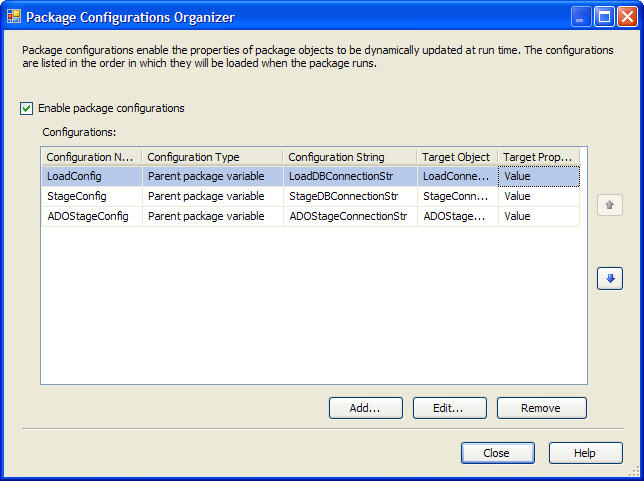
Our initial strategy had been to use Parent Package configurations to set the Value property of the Connection String to the correct server, catalog, etc. It turns out this works, but is not without it's disadvantages. When you try to edit the package configured in this way, it is necessary to put the connection string in the Connection String Value property, because you are not in the execution environment, none has been set from the Parent Package. Additionally, Expressions have to be used with the Connection Manager to accomplish the setting of the target value property with the parent package variable. This is further complicated by having to 'remove' this Connection String value before committing the package to version control, lest the SSIS Server attempt to connect to the developer machine and not the server indicated by the package configuration.

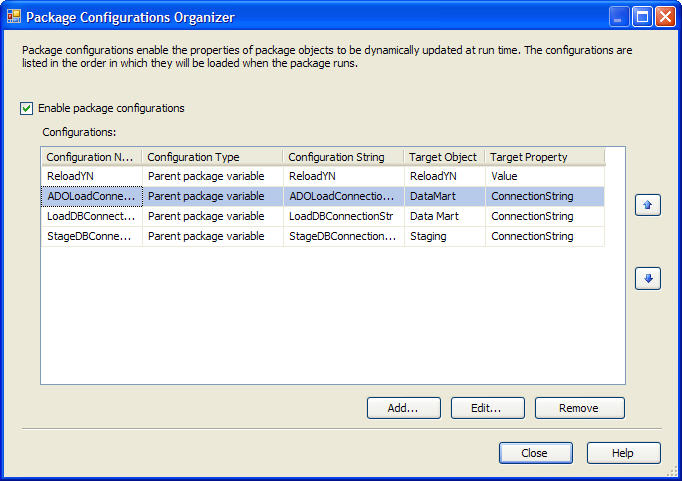
The better solution, it turns out, is to assign the Parent Package variable directly to the Connection String. This way, the true power of runtime package configuration is reali
zed. Using this method, a developer can set one Connection String value in the child package, commit the package to revision control and be confident the Production, Test, etc configuration value will be used when the package executes. Furthermore, if all the developers on a team have identical properties for local execution, the values can remain set in the child package for the developer configuration, and overridden with the correct Production, Test, etc configuration at execution in those environments.


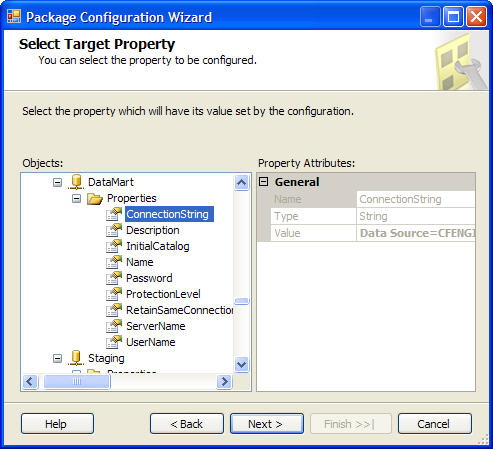
The final shot of setting the Connection String for the Data Mart connection manager is below. If you have any suggestions or questions please post a follow-up. Oh, the tie in to the post headline: Basically set the Package Configuration Properties as close as you can to the intended property.